How to Upgrade Your Capital One Credit Card With No Hard Credit Check (Step-by-Step Guide)
If you’ve been hoping to upgrade your Capital One credit card without dealing with a hard credit check, you’re exactly where you need to be. Most cardholders don’t realize that Capital One allows eligible customers to perform a “product upgrade” — and the best part is, it typically doesn’t require a new application or a hit on your credit score.
In this guide, we’ll walk through everything you need to know: how upgrades work, how to check for offers instantly, and how to use Capital One’s verified upgrade link: https://verified.capitalone.com/auth/signin?Product=Card&Action=ProductUpgrade.
This post is friendly, thorough, and designed to help you make your next financial move with clarity and confidence.
What Is a Capital One Credit Card Upgrade?
A Capital One upgrade, sometimes called a “product change,” is when you switch your current card to a different card within Capital One’s lineup. Instead of opening an entirely new account and taking a hard inquiry, you simply transition the card you already have into one with better rewards, benefits, or features.
What makes this so appealing is that the age of your account, the credit limit, and your full payment history remain intact. You get an upgraded card without resetting the clock on your credit profile.
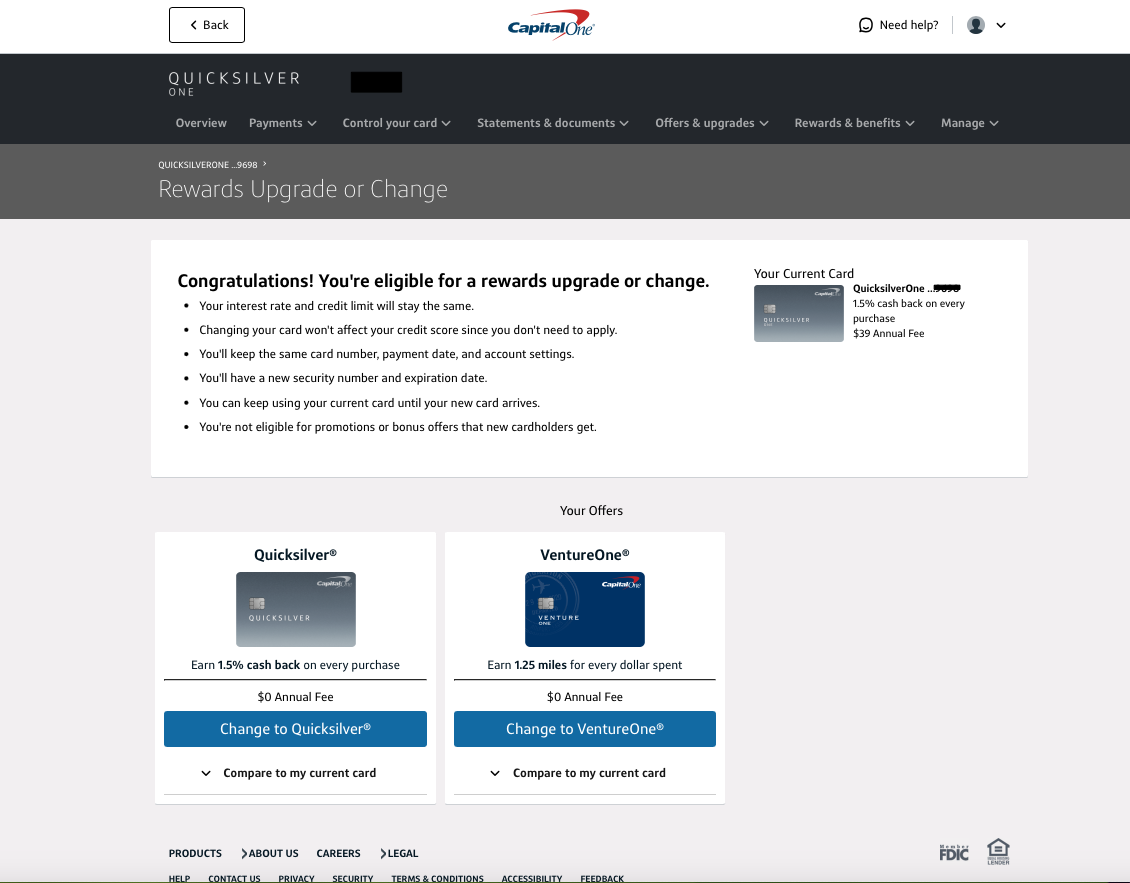
For example, someone who started with a QuicksilverOne card might eventually upgrade to a standard Quicksilver card with better cash-back rewards and no annual fee — all without applying for anything new.
Why Capital One Upgrades Usually Don’t Require a Hard Credit Check
One major reason Capital One stands out is its approach to upgrades. Unlike many banks that treat upgrades as new applications, Capital One generally considers them “internal changes.”
This means:
- No hard inquiry added to your credit report
- Your credit score remains untouched
- Your account length stays the same
- Your credit limit and history are preserved
Instead of evaluating you like a brand-new applicant, Capital One bases upgrade eligibility on your account’s internal performance — such as on-time payments, responsible card usage, and overall profile stability.
If you’re someone who’s working on building or maintaining your credit, this feature is especially valuable because a single hard pull can temporarily drop your score.
Meet the Verified Capital One Upgrade Link
If you’ve ever logged into your Capital One app and didn’t see any upgrade offers, you may assume none are available. But here’s the good news: there’s a direct, verified link that allows you to check upgrade eligibility instantly — even if no offers show up in your app.
Here is the official Capital One upgrade link:
https://verified.capitalone.com/auth/signin?Product=Card&Action=ProductUpgrade
This link takes you to Capital One’s secure upgrade portal, where you can see whether your card qualifies for a product change. Many users report that the link shows upgrade options that were not visible in their regular account dashboard.
It’s safe, secure, and handled entirely through Capital One’s official system.
How to Use the Upgrade Link (Step-by-Step)
Upgrading through the verified link is easy — the entire process usually takes less than two minutes. Here’s the full walkthrough:
Step 1: Open the Verified Link
Click the link below or paste it into your browser:
https://verified.capitalone.com/auth/signin?Product=Card&Action=ProductUpgrade
Step 2: Log into Your Capital One Account
Use your normal Capital One login credentials. This immediately pulls up the upgrade section tied to your profile.
Step 3: Choose the Card You Want to Upgrade
If you have multiple Capital One cards, you’ll see them listed. Select the card you’d like to check for upgrade options.
Step 4: View Available Upgrade Offers
If your account qualifies, Capital One will show upgrade options such as:
- Better cash back rewards
- No annual fee versions
- Travel-focused upgrades
- Cards with improved benefits
If no upgrades are available, the page will simply say so — no harm done.
Step 5: Compare Benefits Before Accepting
Before clicking accept, review the card’s perks, fee structure, rewards rates, and terms. An upgrade should match your lifestyle and goals.
Step 6: Confirm the Upgrade
Once you accept, everything updates instantly. Your new rewards category applies immediately, and a new physical card will arrive within a few days.
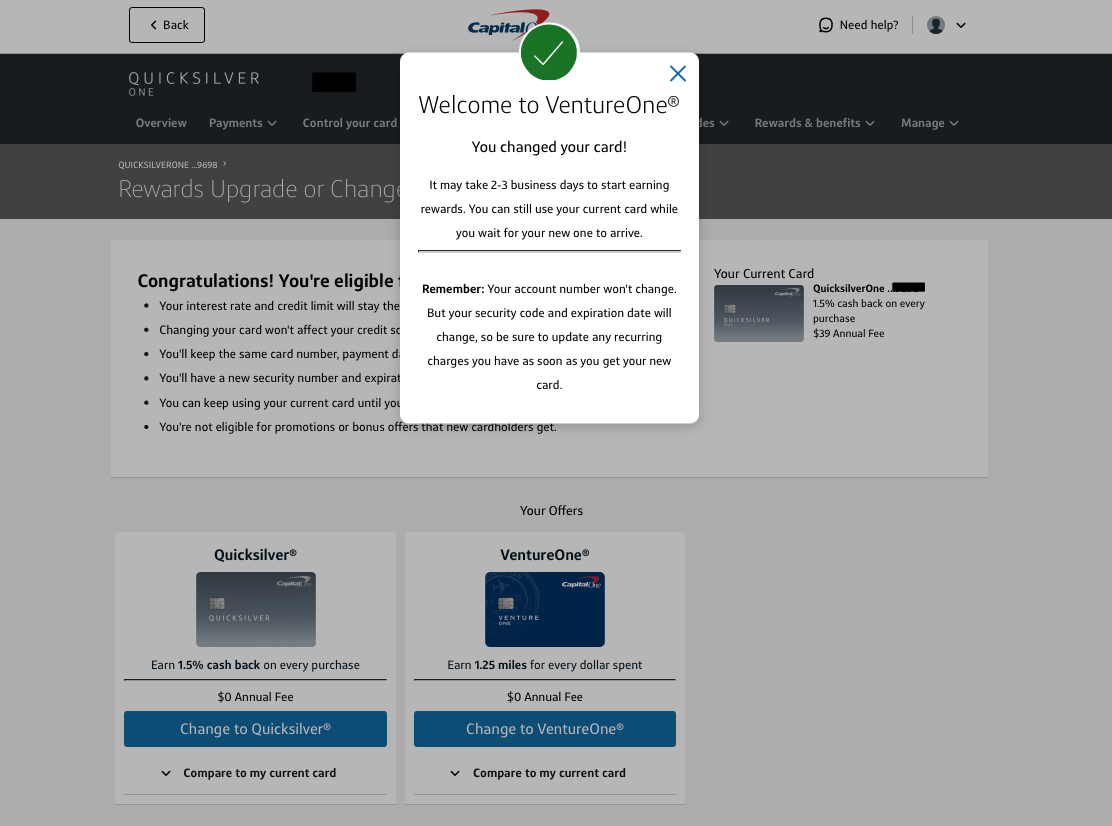
Your account number typically stays the same, but your expiration date and CVV will change with the new card.
Step 7: Wait for Your New Card to Arrive
Your new card ships quickly — usually within 5–7 business days. You can continue using your current card until it arrives.
Which Capital One Cards Can Be Upgraded?
While not every card has an upgrade path, many of Capital One’s cards are eligible depending on your profile. Common upgrade routes include:
- From QuicksilverOne → To Quicksilver
- From Platinum → To Quicksilver or VentureOne
- From Secured → To Unsecured Platinum
- From VentureOne → To Venture
- From SavorOne → To Savor
Each path depends on your account history and internal eligibility, so your available upgrades may look different from someone else’s.
How to Know If You’re Eligible for an Upgrade
Capital One doesn’t publish its internal criteria, but years of cardholder data show clear patterns. You’re more likely to see an upgrade offer if:
- You’ve made consistent on-time payments
- Your card is at least 6–12 months old
- Your balance stays low or moderate
- You’ve received limit increases in the past
- Your credit profile has improved over time
Even if you’re unsure, checking the upgrade link is harmless — it won’t affect your score.
Pros and Cons of Upgrading Your Capital One Card
Like most financial decisions, upgrading comes with benefits and tradeoffs.
Pros
- No hard inquiry on your credit report
- Keep your account’s age (great for credit score)
- Keep your limit and history
- Instant improvements in rewards/benefits
- No new account added to your credit profile
Cons
- No sign-up bonus since it’s not a new card
- Limited upgrade options based on eligibility
If your goal is to maximize bonuses, a new card application might be better. But if you want better rewards without a credit pull, the upgrade path is ideal.
What Happens After Your Capital One Card Is Upgraded?
The moment you accept an upgrade, Capital One updates your card benefits instantly. That means your next purchase will use the new reward structure.
Here’s what else happens:
- You’ll get a new physical card in the mail
- Your expiration date and CVV will change
- Your account number usually stays the same
- Any annual fee changes will apply immediately
The transition is smooth, and there’s no downtime where you can’t use your card.
Real-Life Example: How an Upgrade Can Save You Money
Imagine you started with a QuicksilverOne card, which has a $39 annual fee. After a year of solid usage, you check the upgrade link and see an offer to move to the standard Quicksilver card — no annual fee.
You accept the upgrade. Immediately:
- You save $39 each year
- Your rewards improve
- Your account age remains untouched
- No hard inquiry hits your score
This kind of upgrade is simple but powerful, especially for improving long-term finances.
Frequently Asked Questions (FAQ)
Do Capital One upgrades affect my credit score?
No. Upgrades do not require a new application, so there is no hard inquiry. Your account age and history remain intact.
How often should I check for an upgrade?
Most users check every 30–45 days. Upgrade offers can appear at any time based on your payment and usage history.
Can secured cards be upgraded?
Yes. Many secured cards eventually transition to unsecured versions if you show responsible card usage.
Why don’t I see upgrade offers in my app?
The app doesn’t always display available offers. That’s why the verified upgrade link is so valuable — it may show options your app doesn’t.
Can I downgrade later if I don’t like the new card?
Yes. Most cards can be downgraded or changed again later, depending on eligibility and card family.
Will my card number change after upgrading?
In most cases, your card number stays the same. However, the expiration date and CVV will be new.
Final Thoughts: Should You Use the Upgrade Link Today?
If you want better rewards, a lower fee, or improved perks without risking your credit score, checking the upgrade link is a smart, zero-risk move. It costs nothing, takes less than two minutes, and could elevate your financial experience instantly.
To see if you’re eligible right now, visit the official upgrade portal:
https://verified.capitalone.com/auth/signin?Product=Card&Action=ProductUpgrade
Your next-level credit card may be just one click away.